



Privacy & safety

What we collect. And what Binadu can’t do.

This page lists what Binadu stores, what it never reads on your child’s phone, and how you delete your family’s information.

  • You set the rulesYou choose the apps, the time and the bedtime.
  • No adsBinadu does not collect location or messages. Nothing is sold.
  • Never hiddenThe phone always shows that Binadu is active.

The basics

Four thingsto know first.

Binadu is a parental-control and learning service. We collect only what it needs to limit the apps you chose, run learning activities and show your family what happened. This page also says what Binadu cannot do.

  • Your child can see it

    A parent sets Binadu up and approves the phone. Your child can always see that it is active.

  • A nickname is enough

    You don’t need to give your child’s full name. We collect what your rules and the learning activities need, and nothing more.

  • No ads, nothing sold

    There are no ads, no advertising ID and no third-party analytics or tracking tools. We never sell personal information.

  • What it doesn’t cover

    Rules apply to the apps you choose on an Android phone. What Binadu cannot do is listed further down this page.

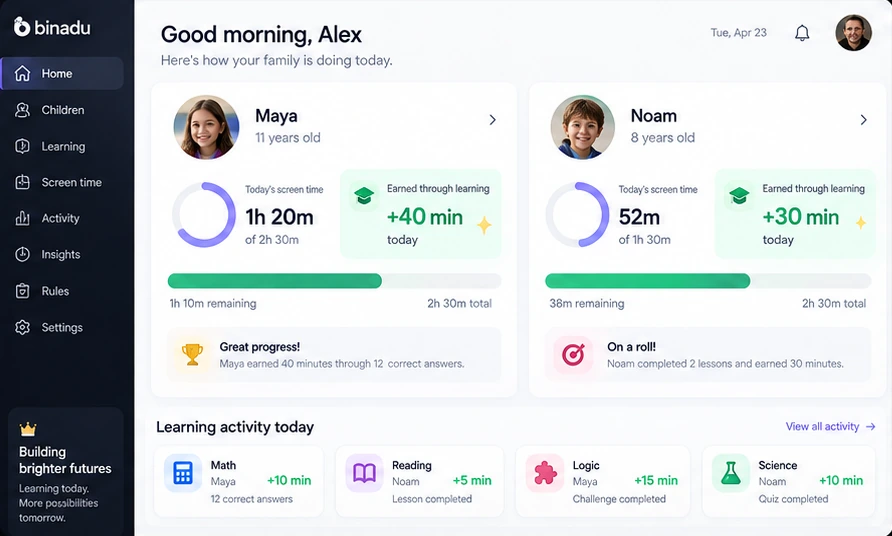
Parent Portal design concept: each child’s screen time today and minutes earned through learning.

Parent Portal: design preview · sample family

What we collect

What we collect(and what we don’t).

This is a plain-language summary of our privacy policy. The policy itself lists every item and how long it is kept.

What we collect

  • About you: your name, email and password (stored only as a one-way hash), and the rules and decisions you set.
  • About your child, from you: a display name (a first name or nickname is enough) and a date of birth.
  • From the child’s phone: the apps in its app list, when the apps you limited were on screen, protection status, and the phone’s make and model.
  • Learning: the answer chosen, time taken, hints used, lessons completed, and requests for more time with a reason from a fixed list.
  • Crash reports, with no name, no usage and no text from the screen.

What we don’t collect

  • Location.
  • Contacts, calls, SMS or other messages, or the content of notifications.
  • Photos, videos, the camera or the microphone.
  • Browsing history or the websites your child visits.
  • Anything shown or typed inside other apps, including passwords.
  • The advertising ID or hardware identifiers such as the IMEI.

Your child never types free text in Binadu, and no artificial-intelligence service receives your child’s information.

Permissions

Each permission,and what it does.

The Binadu app runs on your child’s Android phone. It asks only for what it needs to apply your limits. Before Accessibility is switched on, the app explains it and asks the grown-up setting up the phone to accept.

  • Accessibility service

    Android setting: Accessibility

    What it does
    Reads which app is on the screen and where its windows are. Binadu uses this to count time in the apps you limited and, when time is up, to pause, cover and close the app.
    What it never does
    Never reads what is inside any app: no messages, words on screen, passwords, pictures, videos or websites. Window information stays on the phone.
  • Media access

    Android setting: notification access

    What it does
    Pauses the video or sound of a limited app when its time is used up.
    What it never does
    Does not read your child’s notifications.
  • Visible notification

    Android permission: notifications

    What it does
    Keeps a notification on the phone showing that Binadu is active.
    What it never does
    Binadu never runs hidden from your child.
  • Check-ins

    Internet, and restart after the phone reboots

    What it does
    The phone checks in regularly to get your latest rules and report whether protection is working, so the Parent Portal can show it.
    What it never does
    A check-in carries protection status and time records. It never carries screen content.

Binadu does not ask for location, contacts, camera, microphone, SMS or usage-access permissions.

Control and limits

What you control.What Binadu can’t do.

What you control

  • Which apps are limited, and daily time for them
  • A daily cap on minutes earned through learning
  • Bedtime
  • Approving each child phone with a code
  • Answering requests for more time, and bonus time
  • Switching off a phone, deleting data, closing the account

What children see

  • Their own time, rules and learning
  • That Binadu is active on their phone
  • When time is up, the app closes and they return to the home screen
  • Short reviewed questions to earn minutes, within your cap
  • A wrong answer or a hint never takes time away

Limits you should know

  • Websites in a browser are not blocked. Limits apply to the apps you choose.
  • Android phones only. No iPhone, tablet or computer app.
  • Binadu limits whole apps. It does not filter content inside them.
  • Someone with access to phone settings can switch Binadu off or remove it. Binadu notices those screens and the Parent Portal shows when protection is not working, but it cannot make that impossible.

Your choices

See, corrector delete.

You can stop collection, delete your child’s information or close your account at any time. Each deletion asks for your password or an emailed code, and cannot be undone.

  1. 1. Stop collection

    On the Parent Portal, open “Manage phones” to switch off or retire your child’s phone. Uninstalling stops collection too, but does not delete what we hold.

    Manage phones (opens the Parent Portal)
  2. 2. Delete it yourself

    Open “Delete data” to delete one child’s information or close your parent account.

    Open “Delete data” (opens the Parent Portal)
  3. 3. Or ask us

    Email privacy@binadu.app to see, export, correct or delete your family’s information. We confirm with you before deleting anything.

    How to delete your data (opens the Parent Portal)privacy@binadu.app

How long we keep it

InformationKept for
Detailed records of app useUp to 30 days
Daily time records and rule changesUp to 13 months
Learning historyUp to 13 months after the last activity
Crash reports and server logsUp to 14 days
Encrypted backupsUp to 30 days
Your parent accountUntil you close it

After a deletion starts, information leaves our live database within 24 hours and encrypted backups within 30 days.

Want to try itwith your family?

Binadu is in early access for families with an Android phone.

Get early access