Parent login

Log in, or set up your family.

You manage your family on Binadu in the Parent Portal. It opens in a web browser, so there is nothing to install.

  • Choose limited apps
  • Set daily time
  • See learning results

Log in to the Parent Portal

Sign in with your email and password, or with Google. You sign in on the Parent Portal. This website never asks for your password.

Log in to the Parent Portal (opens the Parent Portal)

Opens app.binadu.app

On the sign-in page, type your email and choose “Email me a recovery link”.

Early access

Get early accessor set up your family

Binadu is in early access for families with an Android phone. Setup takes four steps:

  1. Create your parent accountUse your email and a password, or Google. Verify your email, then sign in.
  2. Accept the privacy noticeRead it, accept it, and add your child with a nickname and date of birth.
  3. Install Binadu on your child’s phoneThe child app runs on Android phones.
  4. Approve the phone with its codeOn the child’s phone choose “Set up with your parent”, then scan its QR code or type its code on the Parent Portal.
Create a parent account (opens the Parent Portal)

The child app is not listed in a public app store yet. Ask us about early access

The Parent Portal

What you doin the Parent Portal.

The rules you set in the portal apply on your child’s phone, and what the phone reports shows up in the portal.

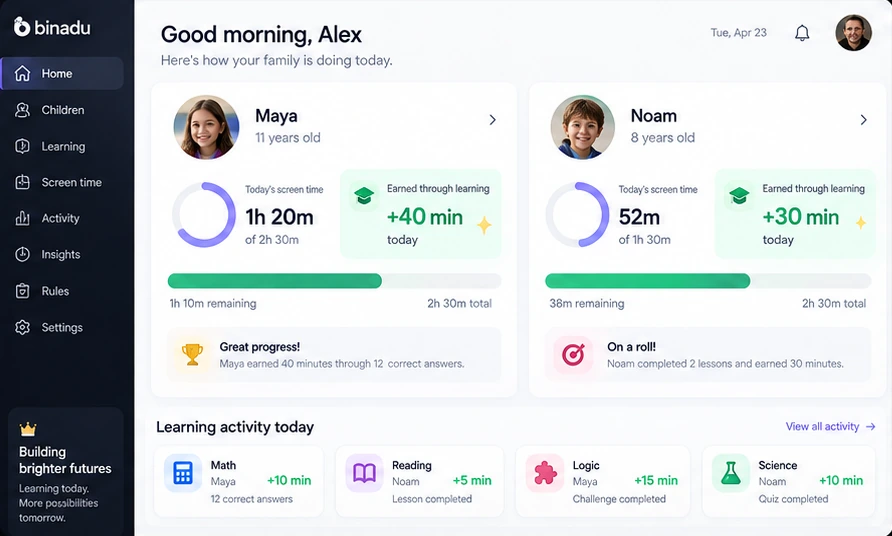
  • See today’s screen time and whether protection is working
  • Choose which apps are limited, with daily time and bedtime
  • Set a daily cap on minutes earned through learning
  • See learning results
  • Answer requests for more time, or give bonus time
  • Approve, switch off or retire your child’s phones
  • Delete data or close your account yourself
Parent Portal design concept: each child’s screen time today and minutes earned through learning.

Parent Portal: design preview · sample family

Good to know

A few factsabout Binadu.

  • Privacy

    A nickname is enough for your child. No ads, no tracking tools, and personal information is never sold.

  • Learning

    Short reviewed questions and lessons in Math, Reading, Science, Language and Logic.

  • You set the rules

    You set the limits and the learning cap. Your child can’t change them.

  • Hebrew and English

    Binadu works in Hebrew and English. Your child always sees their own time and rules.

Want to seehow it works?

See how a day with Binadu works, for parents and children.

See how it works